
Features
Everything in the pit. Nothing you don’t use.
Built with bomber and hornet teams for real race days: gloves on, bad signal, five minutes before the heat.
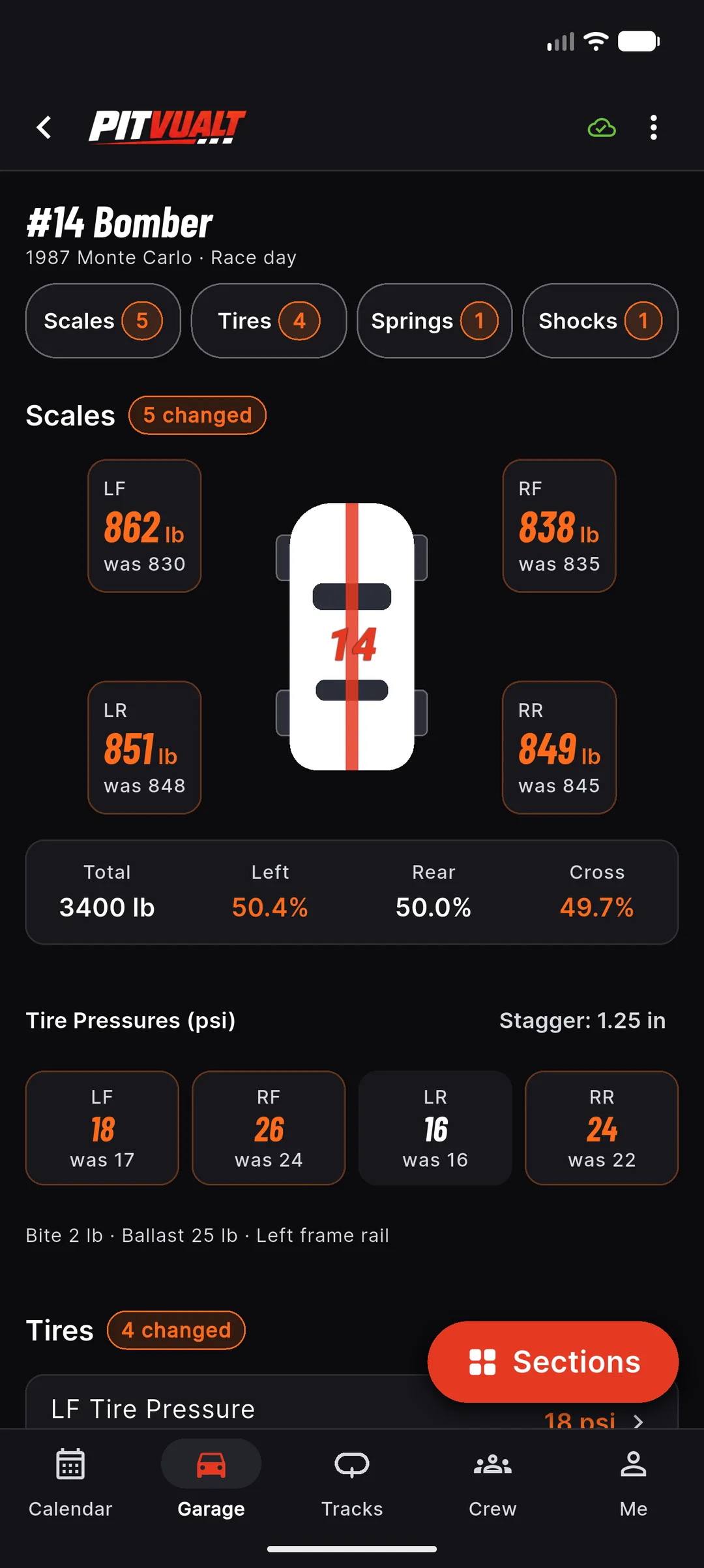
Every car. Every track. Every race day.
Setup book
Save the factory baseline once, then a setup for every race day at every track. Pull into Redwood Acres and PITVUALT already has last September’s feature setup, how it finished and what the weather was. Tap Load this setup and go to work. Anything that changed from baseline lights up orange.
- Scales, tires, springs, shocks, ride height, geometry, rear end, engine, brakes and notes — over 100 fields in 12 sections
- Stock suspension, coil-overs, jack bolts and adjustable bars — every template is editable
- Tap a value for the big-number editor: huge +/− steppers you can hit with gloves on, baseline and last time shown under the number
- Works with no signal; syncs when you get bars back
Plan: Free: 1 car, 3 tracks · Racer+: unlimited
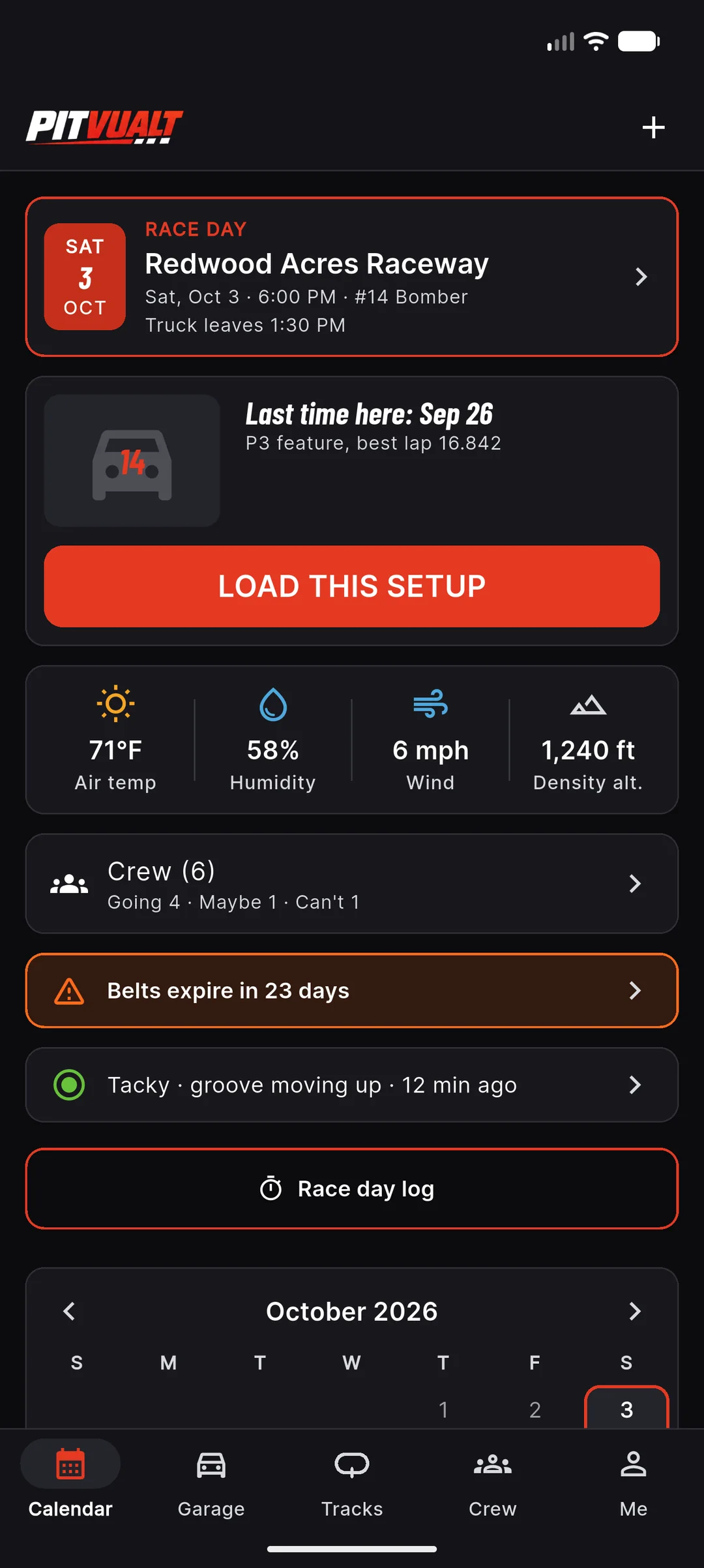
Your season on one page.
Race calendar
Calendar is the first tab. The next race day sits on top with last time here, a Load this setup button, the forecast, the crew count and any gear that’s about to run out. Below it is a month view with a dot for every race day and a Coming up list with the crew counts. Tap the + to plan a race day.
- Next race card: last time here, Load this setup, weather and the latest track report
- Month view with a dot per race day: going, maybe, can’t, no reply or raced
- Coming up list with crew counts — Going · Maybe · Can’t — and rain chance when there’s a forecast
- Gear and license dates flagged before they run out
- Recap cards to share after a race night, free on every plan
Plan: Free · crew RSVP on Crew
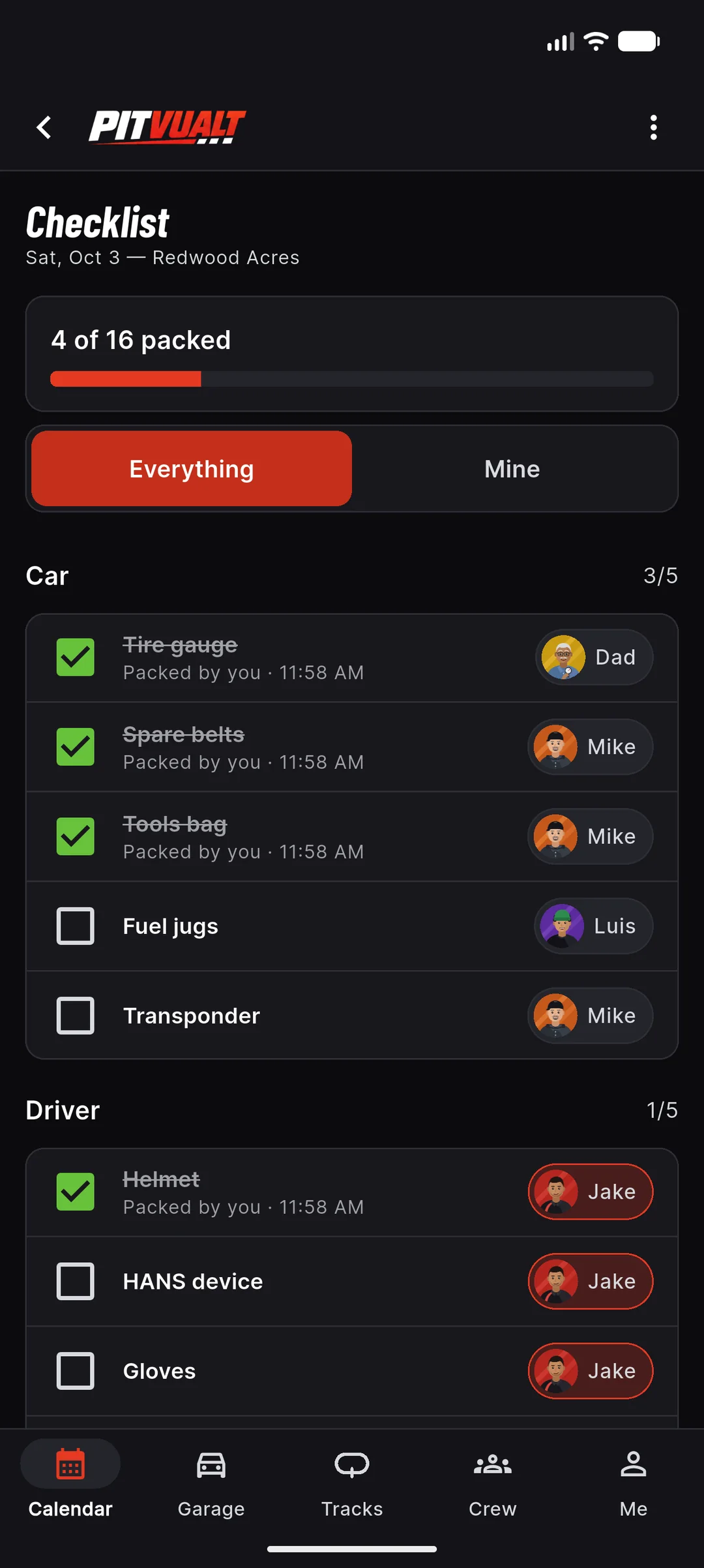
Nothing left in the shop.
Race-day checklist
Build your master list once — tire gauge, spare belts, tools bag, fuel jugs, transponder, helmet, HANS, gloves, fire suit, tech card. Every race day starts from it, with a progress bar so you can see what’s left. On Crew you also assign each item to a person, so everyone knows who’s bringing what.
- One master list; each race day gets its own copy to tick off
- Progress bar: “4 of 16 packed”
- Mark an item “Only at” a track to bring it just there
- Everything / Mine switch so each person sees their own items
- Assign items to crew and see who packed what (Crew plan)
Plan: Free · assigning items to crew is on Crew
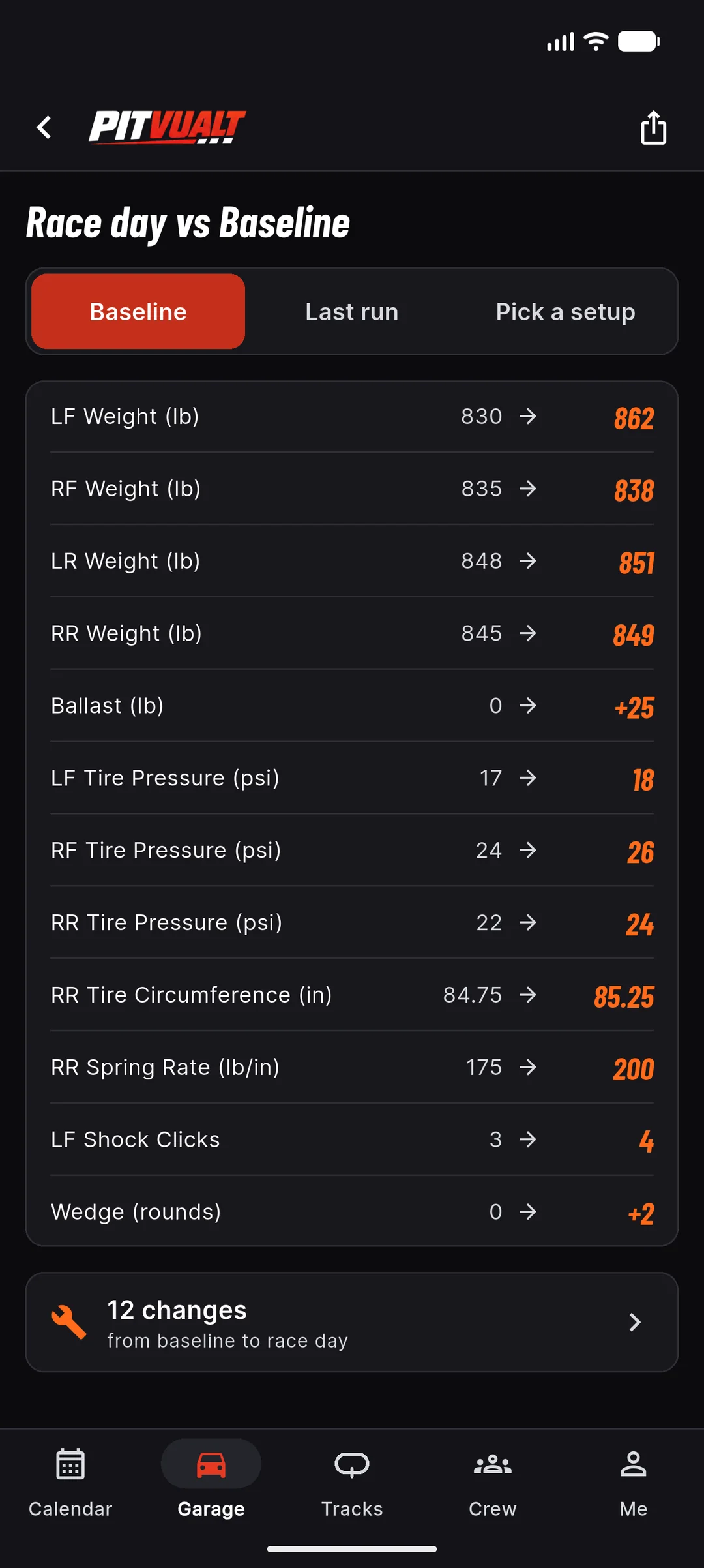
See what changed. Only what changed.
Compare
Stop flipping through notebooks. Compare shows only the fields that moved, from → to, with the new number in orange. Switch between Baseline, Last run and Pick a setup, and share the diff with your crew.
- Race day vs baseline, last run or any saved setup
- “12 changes from baseline” at a glance
- Tap a row to jump straight to that field
Plan: Free
Know before tech.
Tech check
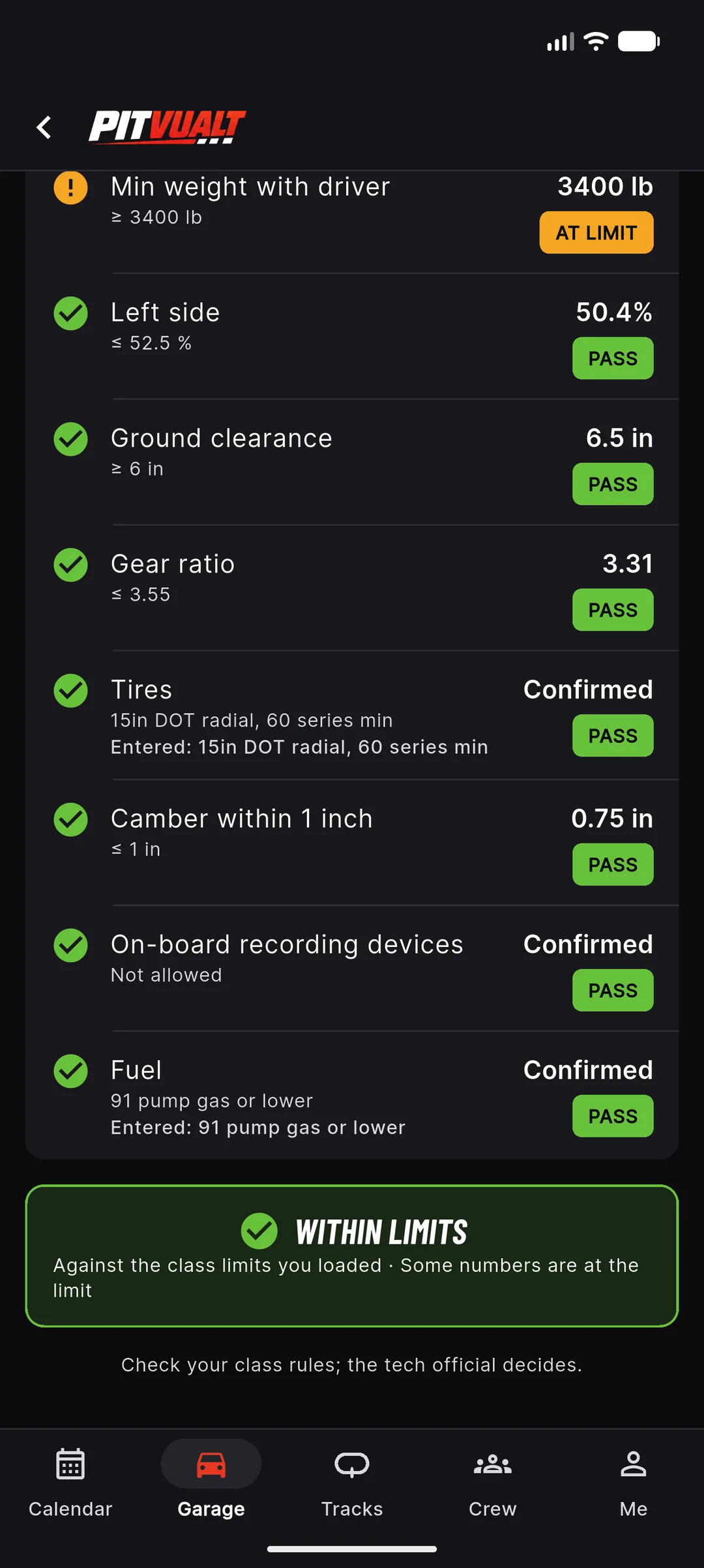
Load your track’s class preset and PITVUALT checks your setup against it: pass, at the limit, fail, or not entered. You get a summary — “Within limits” when everything is inside what you loaded. Fix it in the pits, not in the tech line.
- Min weight with driver, max left %, gear ratio, ground clearance, tire spec, camber, fuel, on-board devices and more
- “At limit” warning when you’re within a hair of a number
- Ballast helper tells you how many pounds to move
- Starter presets: Las Vegas Bullring Bomber (2022 rulebook) and Willamette Speedway Street Stock (limits being confirmed), plus Bomber, Hornet, Mini Stock and Street Stock templates
Plan: Racer+ · Free gets one demo check
Check your class rules; the tech official decides.
Every car has a home base.
Car home & cost ledger
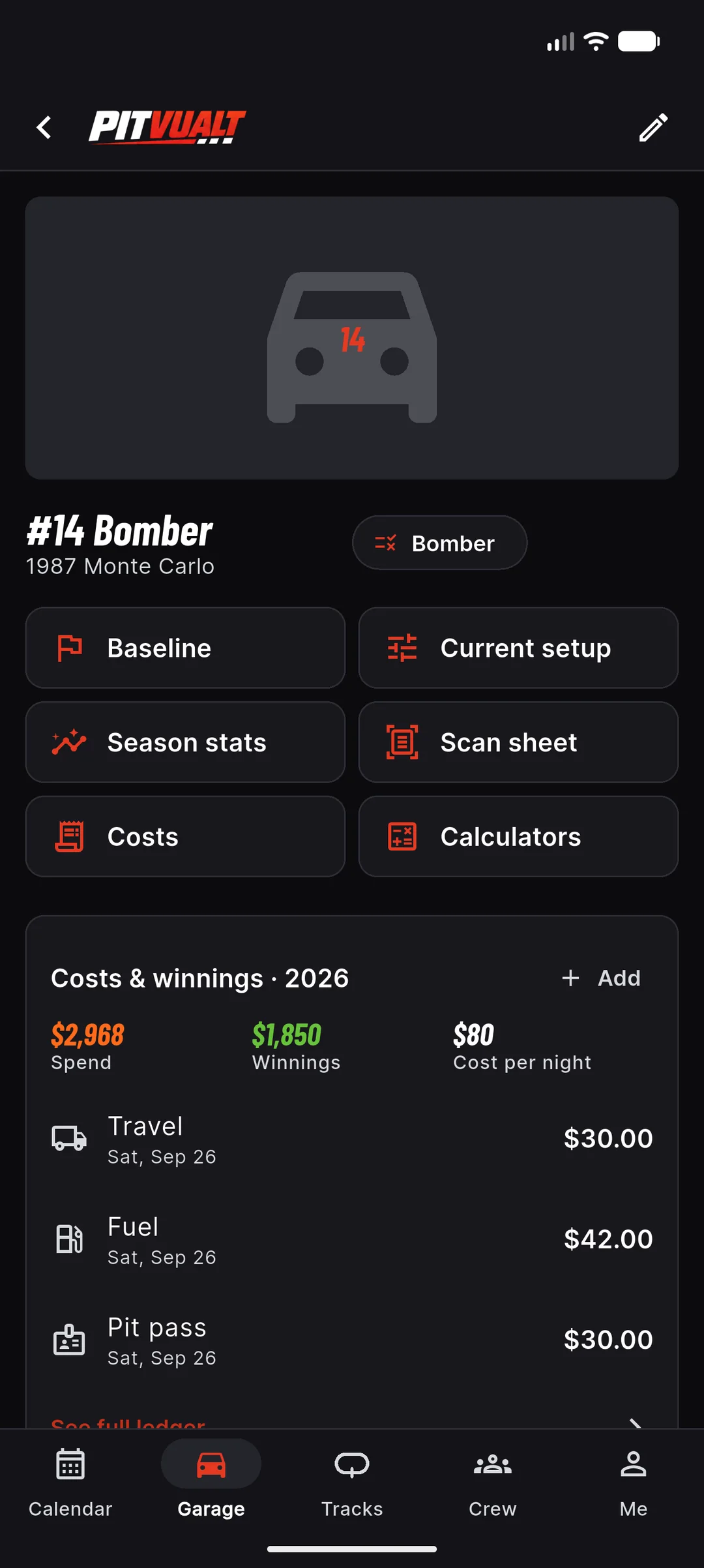
Open a car and everything for it is one tap away: Baseline, Current setup, Season stats, Scan sheet, Costs and Calculators. The cost ledger tracks entry fees, fuel, tires, travel, pit pass and winnings, and rolls them up to a cost per night — or a profit per night when you cash more than you spend.
- Baseline, current setup, season stats, scan and calculators one tap from the car
- Log entry, fuel, tires, travel, pit pass and winnings — from the car or the race-day page
- Spend, winnings and cost per night; it flips to profit per night when winnings beat spend
- Inventory and parts life Coming later
Plan: Car home: Free · costs & winnings: Racer+
Pit-lane math, prefilled.
Calculators
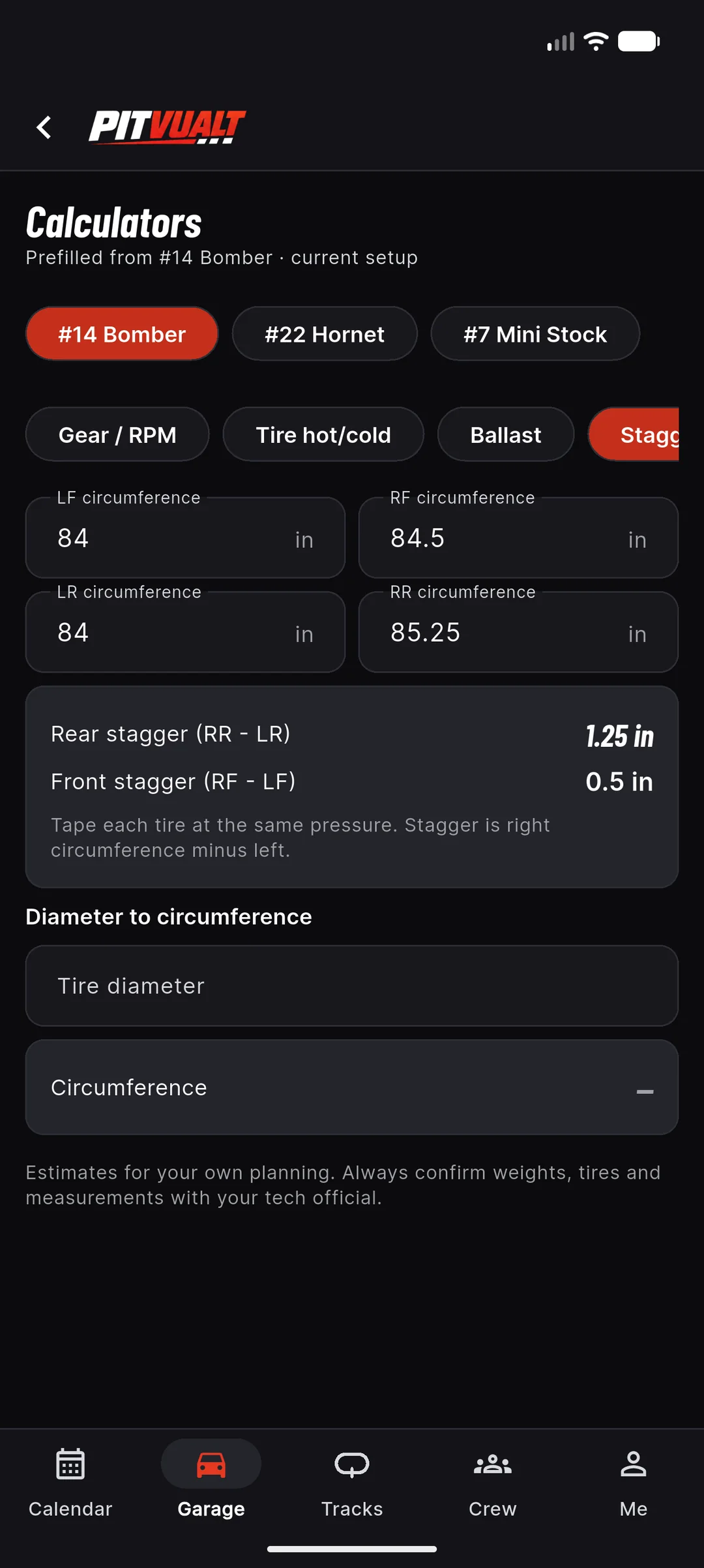
Pick a car and the calculators fill themselves in from its current setup: gear ratio and tire diameter for RPM, rear and front stagger from the four tire circumferences, ballast to reach the class minimum, and a move-weight target for left percentage. Estimates for your own planning — confirm weights, tires and measurements with your tech official.
- Gear / RPM: solve for RPM, MPH or gear
- Stagger: rear and front from the tire circumferences, plus diameter to circumference
- Ballast: weight short of the class minimum, and weight to move for a left target
- Tire hot/cold, and one switch between your cars
- The same math runs free on the web, no sign-in
Plan: Free
Estimates for your own planning. Always confirm with your tech official.
Don’t get caught by an old belt tag.
Driver hub & gear expiry
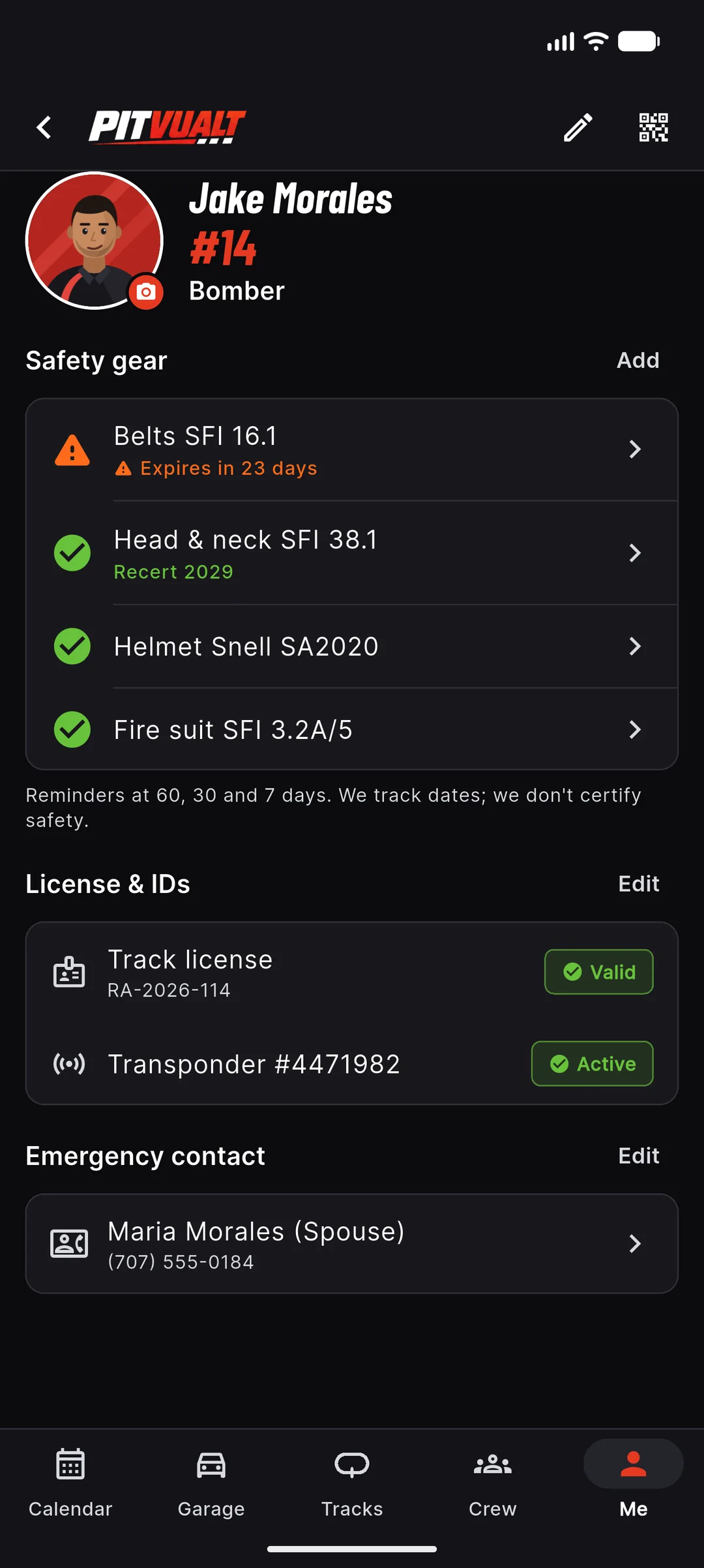
Snap the tag, confirm the date, done. SFI 16.1 belts are flagged two years from the date of manufacture, SFI 38.1 head-and-neck restraints at five-year recert, and helmets against the Snell standard your track wants. License, transponder, emergency contact and a tech check-in card live on the same page.
- Reminders at 60, 30 and 7 days before a date runs out
- Snell SA standard flagged when it’s older than your track minimum
- Track license (Valid) and transponder (Active) at a glance
- Emergency contact and a tech check-in card
- Minor drivers live under a parent-managed profile — never public
Plan: Free
We track dates. We don’t certify gear — your tech official and the manufacturer do.
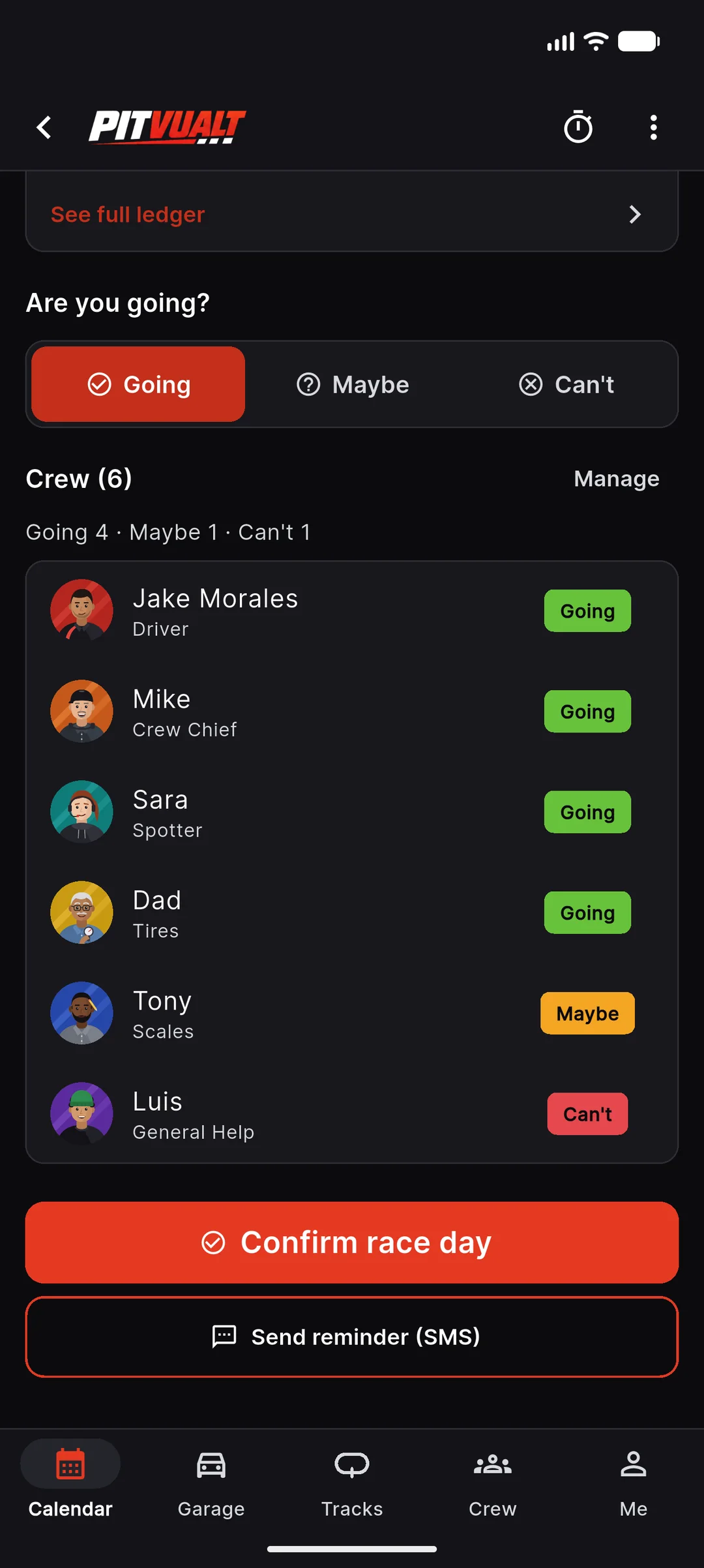
Who’s coming Saturday?
Crew planner & RSVP
Create the race day, pick the track and the car, and invite the crew. Everyone answers Going, Maybe or Can’t, and you see the count — Going 4 · Maybe 1 · Can’t 1 — before you load the trailer. Confirm the race day when it’s on. Crew get a reminder before the day; text reminders for people who never open apps are coming later.
- Going · Maybe · Can’t counts on the calendar and the race-day page
- Crew list with each person’s role and answer
- Tow plan row: when the truck leaves
- Confirm the race day and send the crew a reminder
- Text reminders for crew without the app Coming later
Plan: Crew
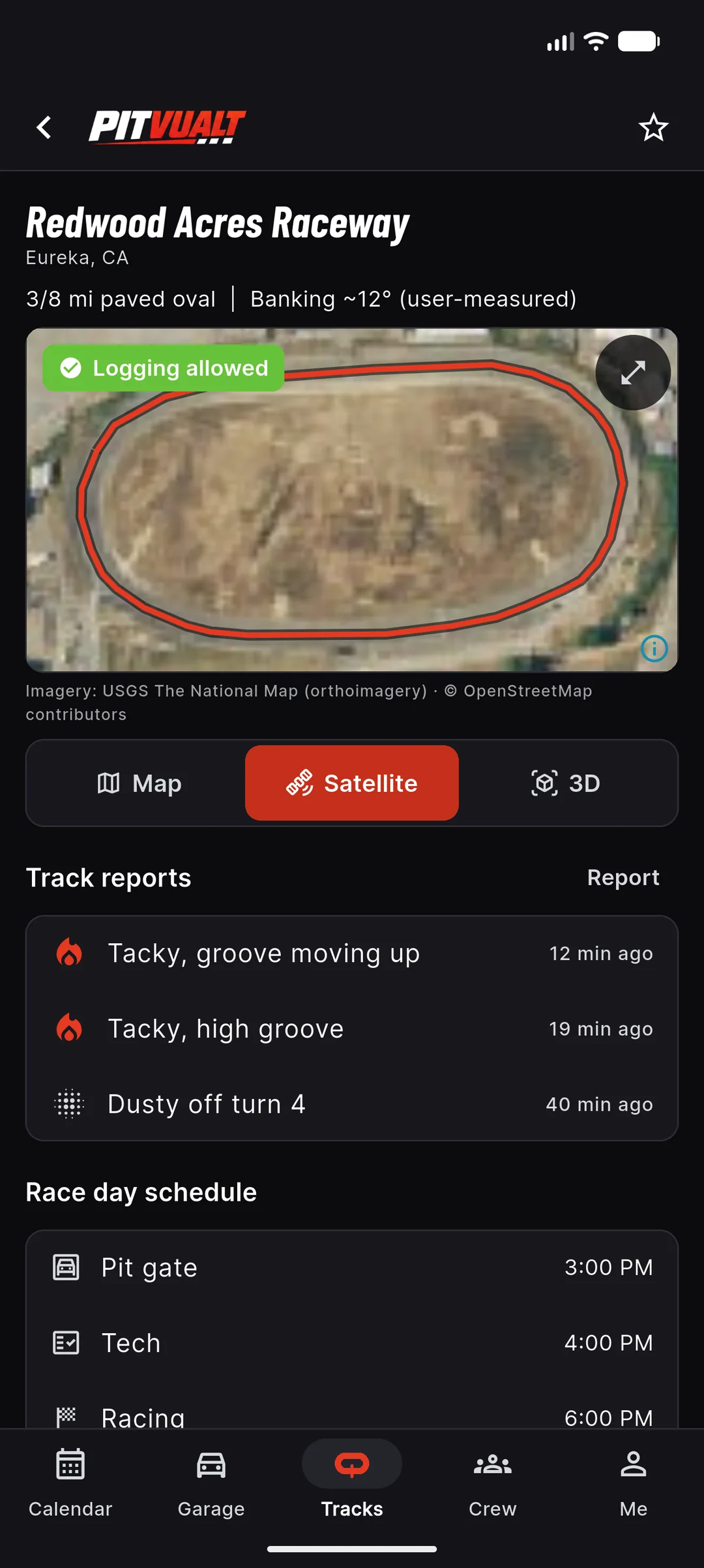
784 ovals across 48 states, one map.
Track network & conditions
Surface, length, banking, classes and rules links for the ovals we know across the country, wherever we have them, on a map, a satellite view or in 3D, with the track outline drawn in red. Racers in the pits report conditions — tacky, slick, groove moving up — and everyone else sees it with a time stamp.
- Map, Satellite and 3D views with the track outline
- Searchable by state, surface and class
- Racer-reported conditions with time stamps
- Rainout and schedule notices for your favorite tracks
- Severe-weather alerts from the National Weather Service
- Device rule badge per track: logging OK, scan in pits only, or unknown
Plan: Free
Satellite imagery: USGS The National Map. Track outlines and map data © OpenStreetMap contributors.
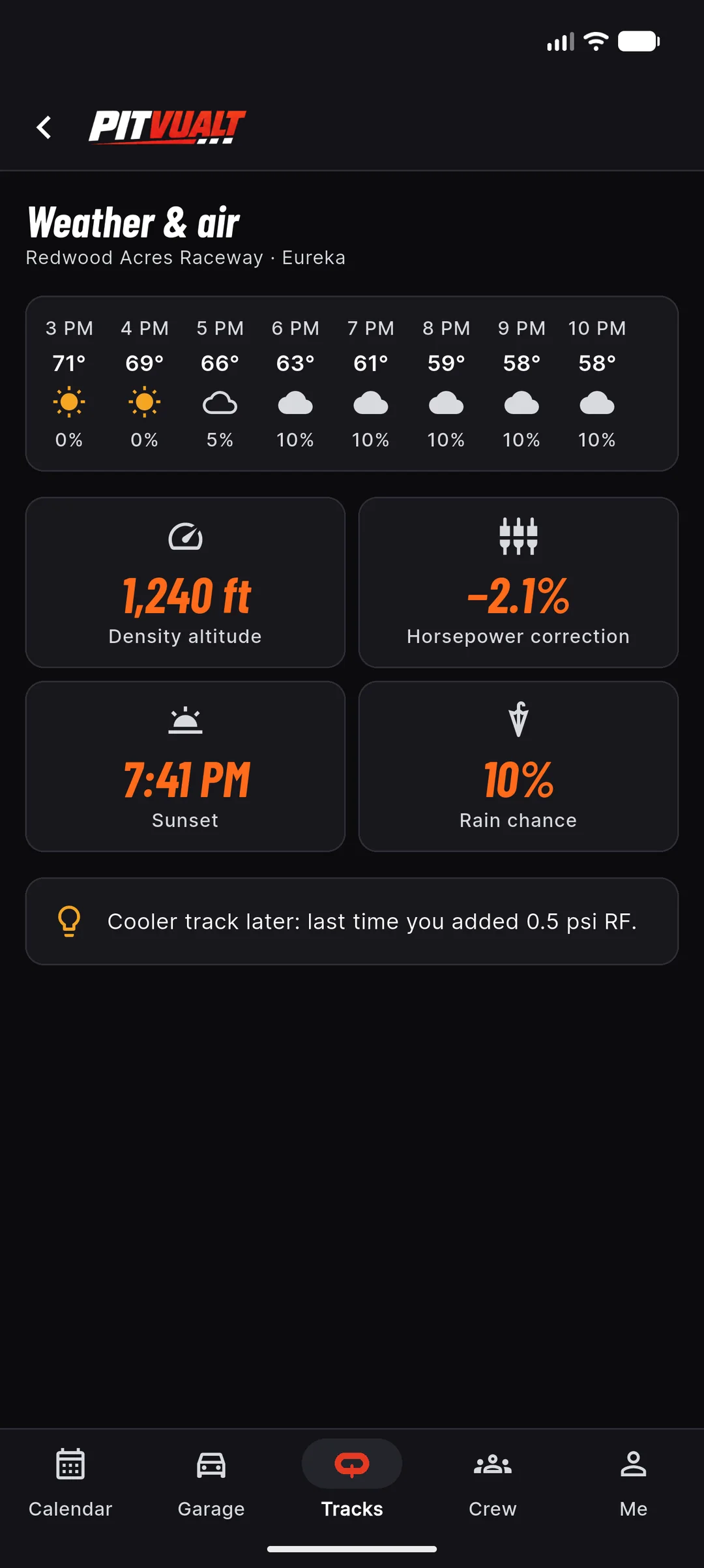
Know the air you’re racing in.
Weather & density altitude
Hourly temp, humidity, wind and rain chance for race day, plus density altitude and an SAE-style horsepower correction so you can line today up against the race days you’ve logged. Pro adds a tip from your own history, like “last time you added 0.5 psi RF.”
- Hourly 3 PM–10 PM race-day strip
- Density altitude + HP correction
- Sunset time and rain chance
- Saved with every setup so you can compare later
Plan: Free · insight card on Pro
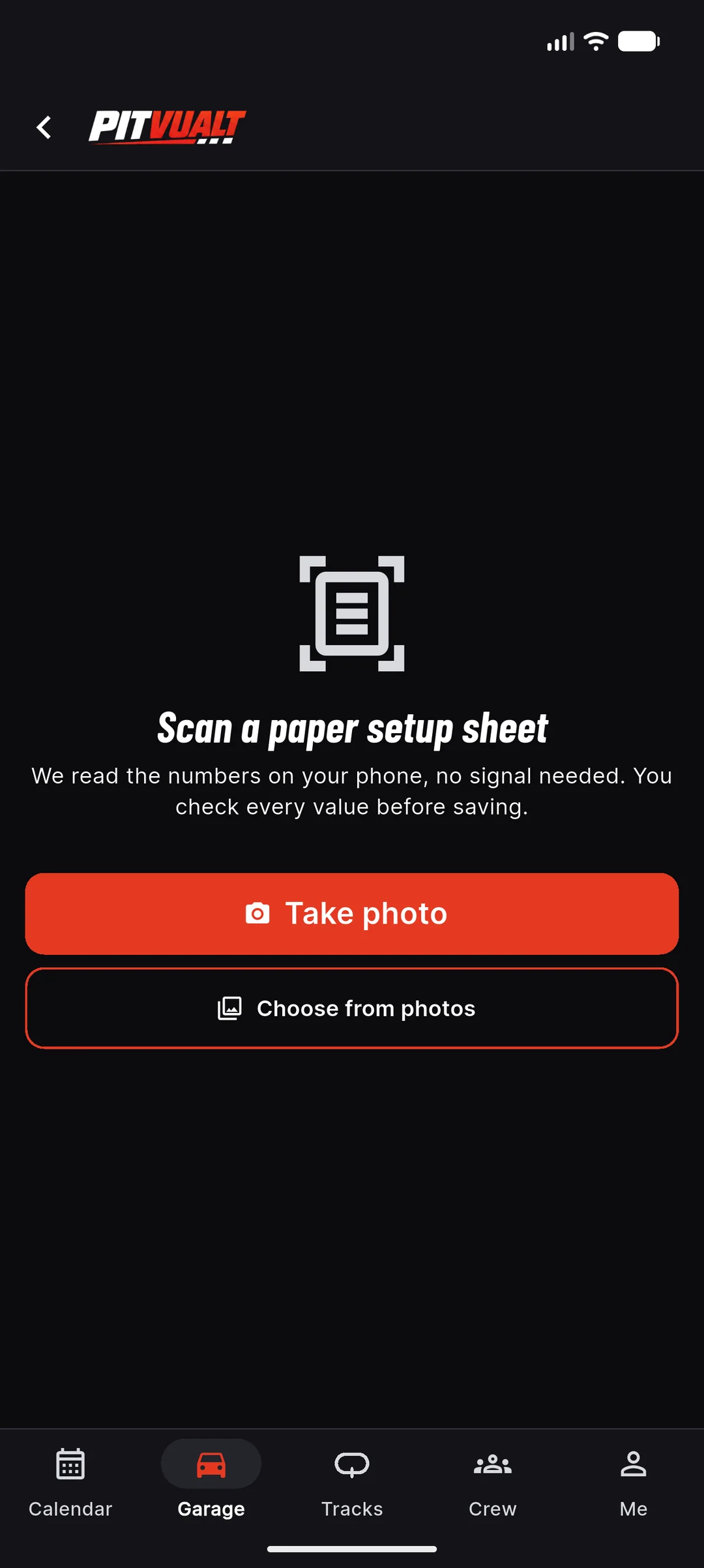
Your paper sheet, in the app in seconds.
Photo scan
Years of setups on paper? Point your phone at the sheet. The app reads the numbers on the device, maps them to the right fields, and lets you fix anything before you save.
- Take a photo or choose one from your phone
- Reads on the phone first — works in the pits
- Review every value before it saves
- Cloud scans a month: 5 on Free, 20 on Racer, 200 on Pro
Plan: Free 5/mo · Racer 20 · Pro 200
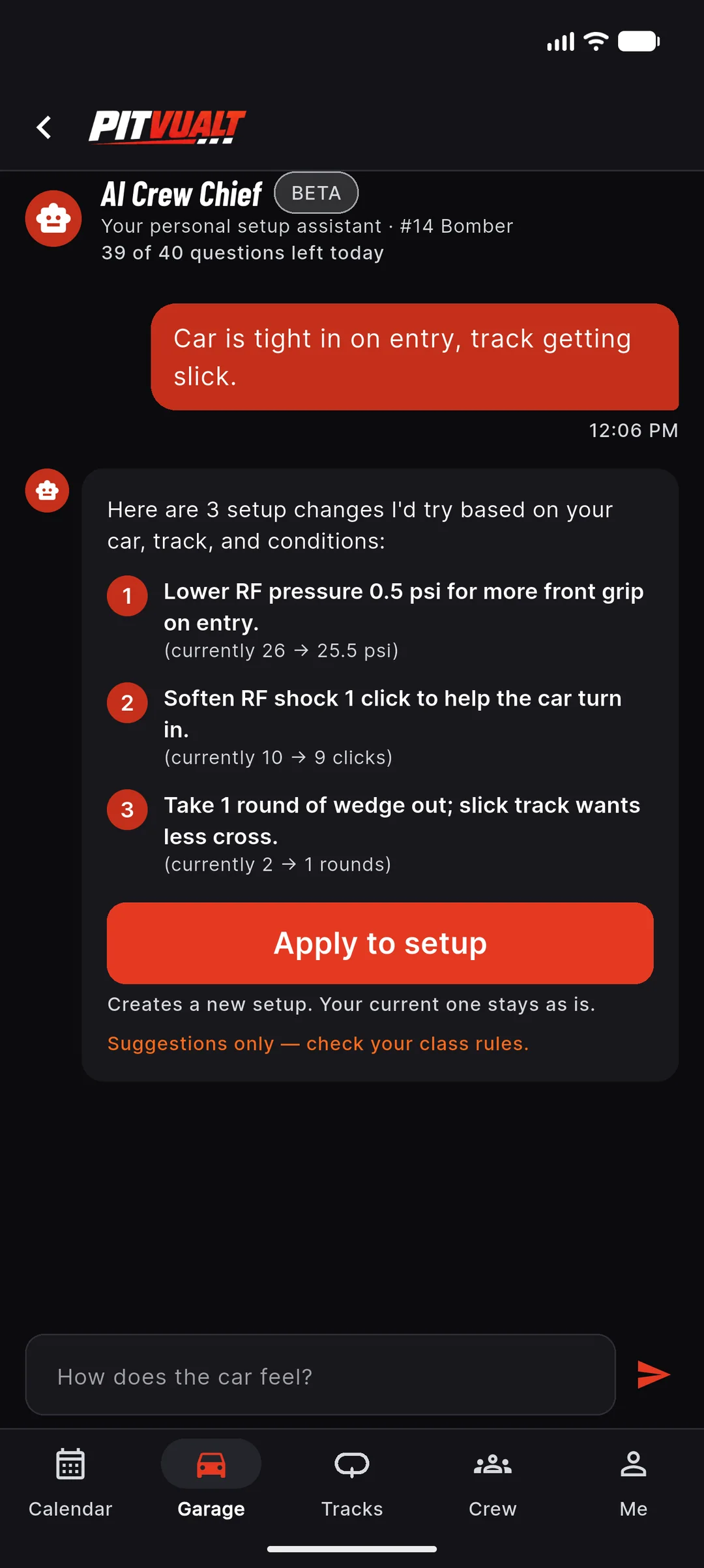
A second opinion when the car’s tight.
AI crew chief
“Tight in on entry, track getting slick.” The AI crew chief answers with numbered, specific suggestions based on your current values — and Apply to setup makes a new setup, never overwrites the old one.
- Suggestions reference your actual numbers
- Apply creates a new setup; nothing gets overwritten
- 20 questions a day on Pro, 40 on Crew
- Off when you’re offline — and it tells you why
Plan: Pro · Crew
Suggestions only — check your class rules.
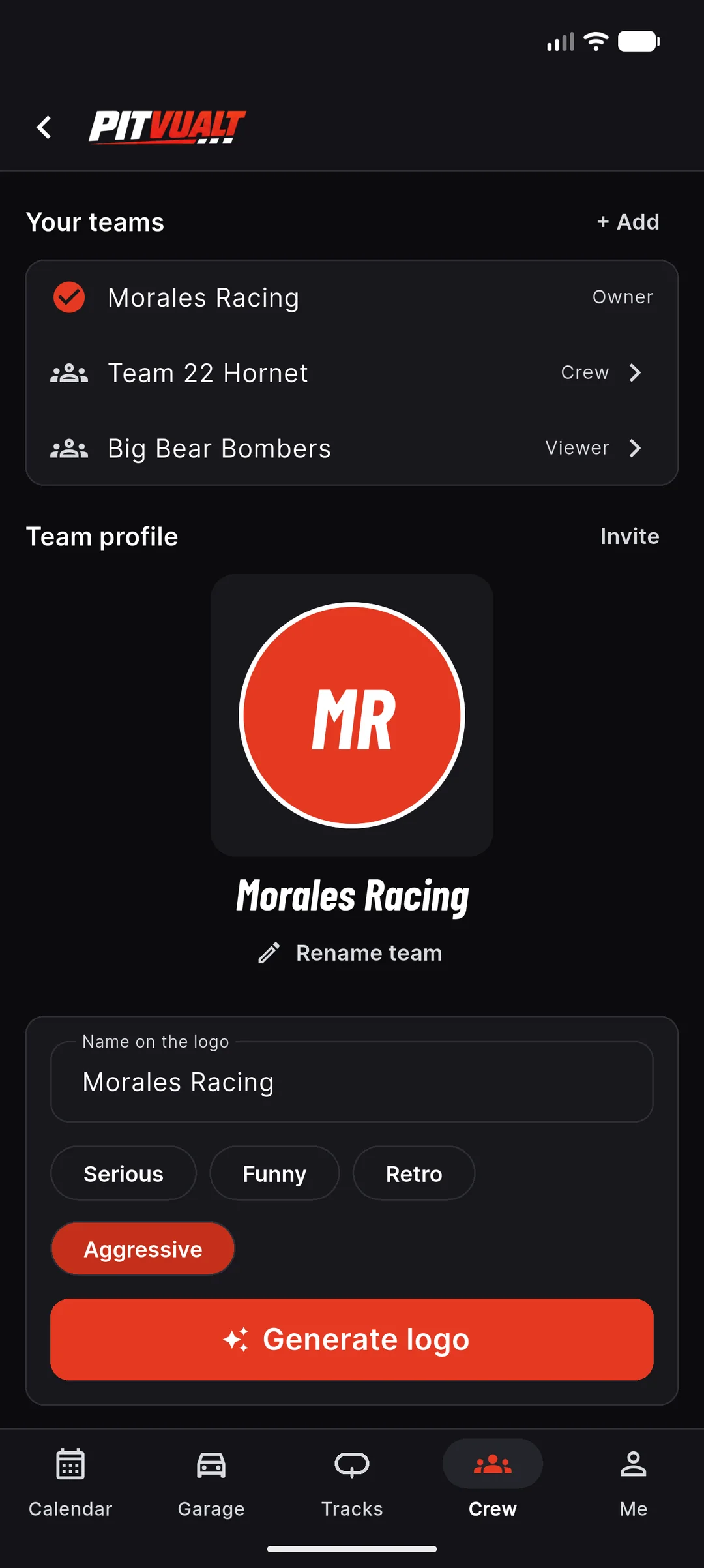
Your team, your colors.
Teams & branding
Owner, crew chief, crew, driver, viewer — everyone sees what they should. Switch between teams in one tap. Need a logo for the door or the hauler? Generate a few options and pick one.
- Roles: owner, crew chief, crew, driver, viewer
- Viewers are always free
- AI logo options: serious, funny, retro, aggressive
- Sponsor report on Crew Coming later
Plan: Teams: all plans · AI logos: Crew (3 free tries)
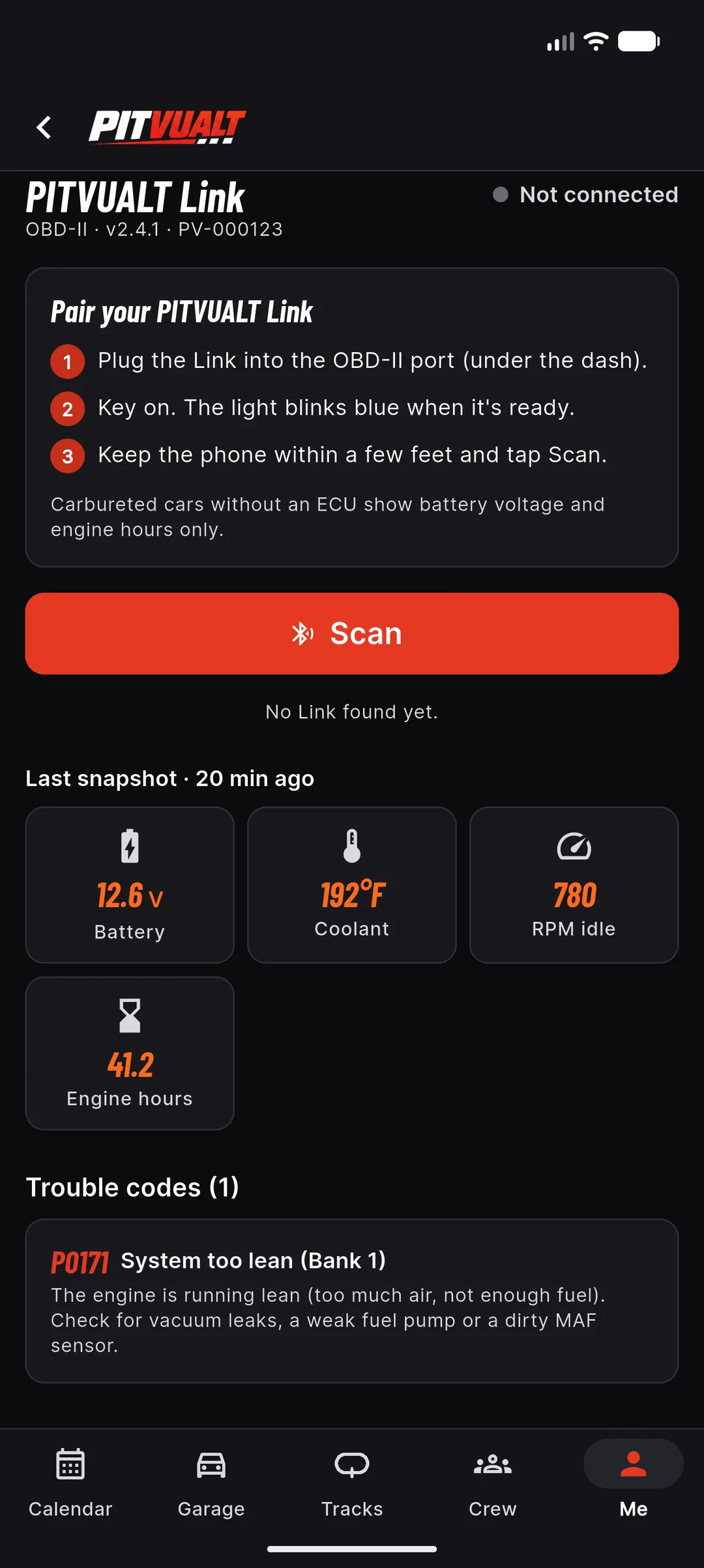
Codes in the pits. Not on the track.
PITVUALT Link device
Plug it in, pair it, and read codes in plain English: battery, coolant temp, idle and engine hours. Where a track allows logging, it can log; where it doesn’t (or we don’t know), it stays in pit-scan mode.
- Trouble codes with plain-English explanations
- Pit snapshot: battery, coolant, idle RPM, engine hours
- Per-track rule: unknown is treated as pits-only
- No live telemetry during races
Plan: $49 one-time · needs Pro or Crew · one included with Crew
Also in the box
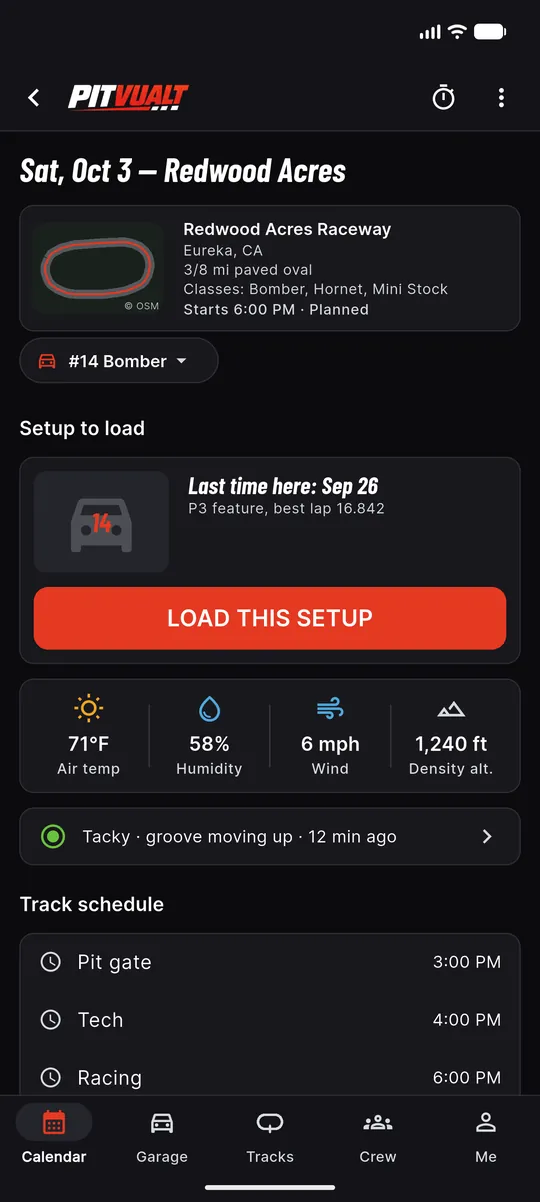
Race-day page
Track, car, setup to load, weather, schedule, tow plan and checklist for one race day.
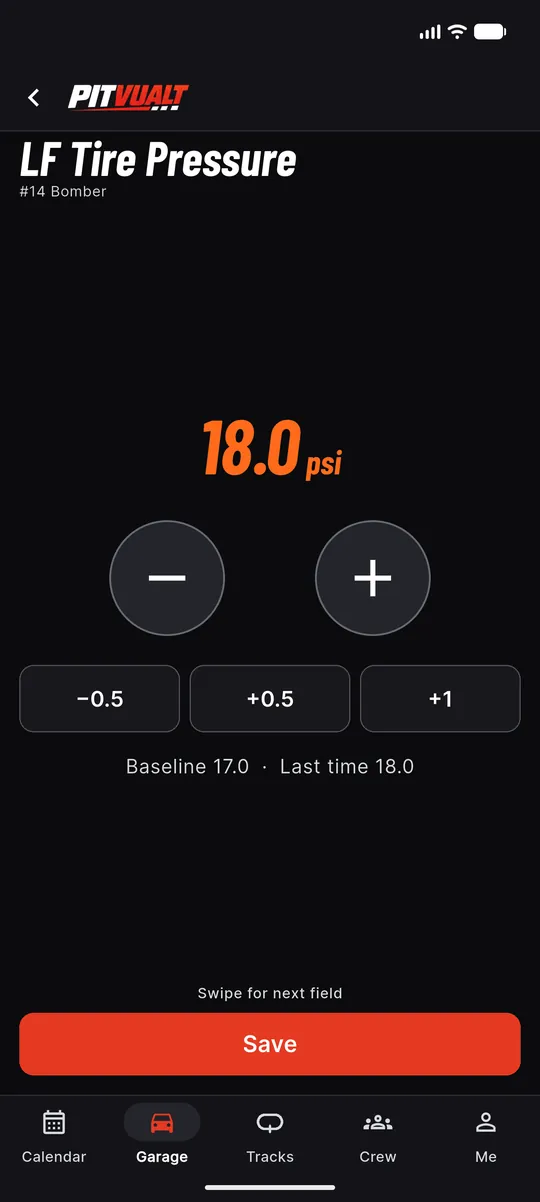
Fast edit
Huge steppers and a swipe to the next field. Baseline and last time shown under the number.
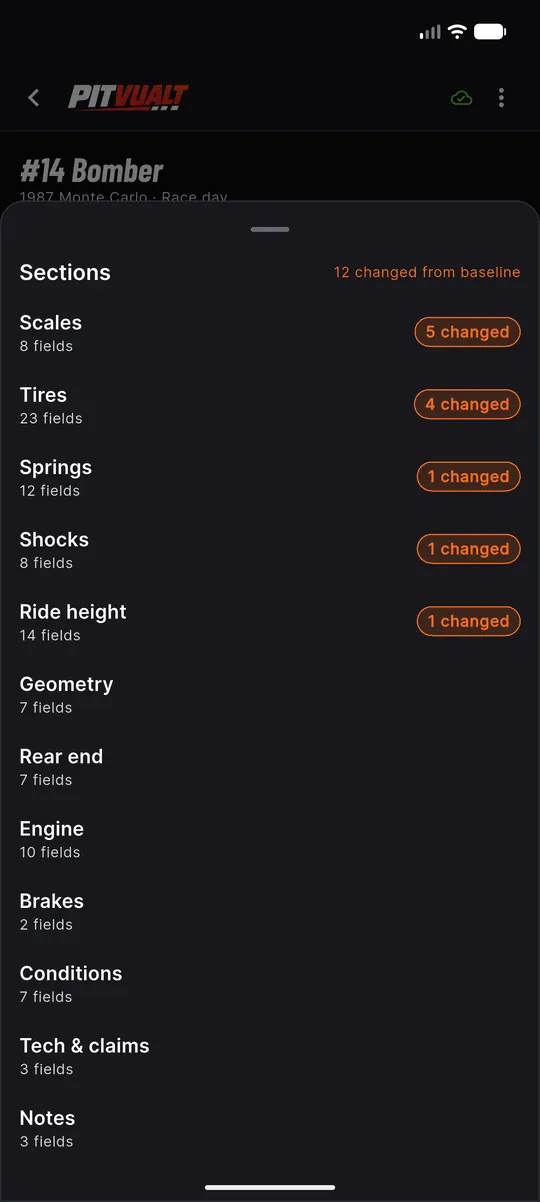
Setup sections
Twelve sections with a count of what changed from baseline in each.
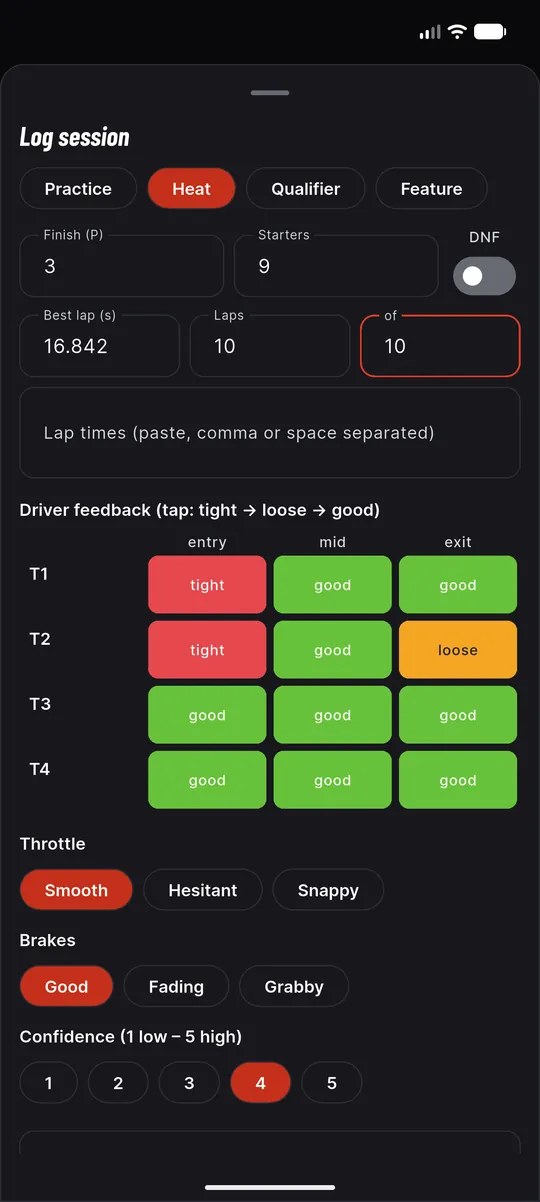
Race log
Heats, qualifiers and features: finish, best lap, lap times, corner-by-corner feedback and voice notes.
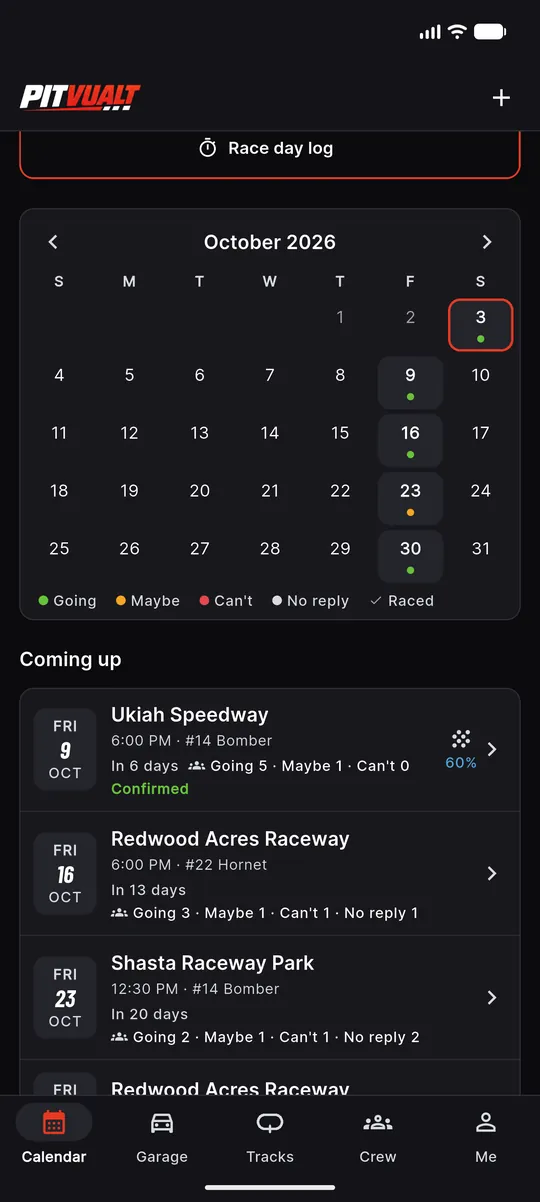
Month view
Every race day in the month with a dot for who’s going, plus a Coming up list with rain chance.
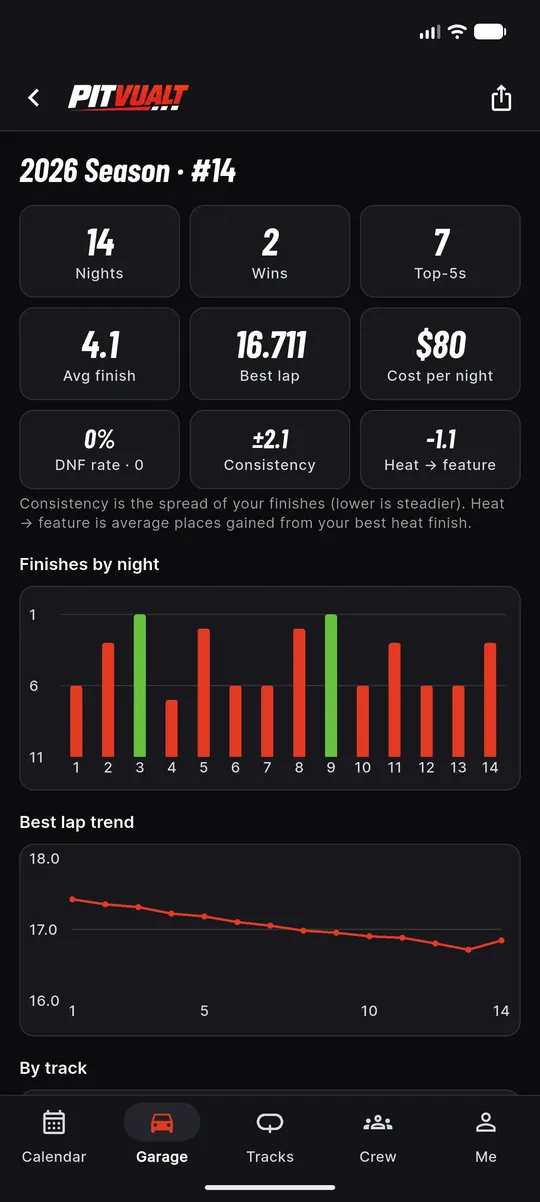
Season stats
Nights, wins, top-5s, average finish, best lap, DNF rate and consistency, with a finishes-by-night chart.
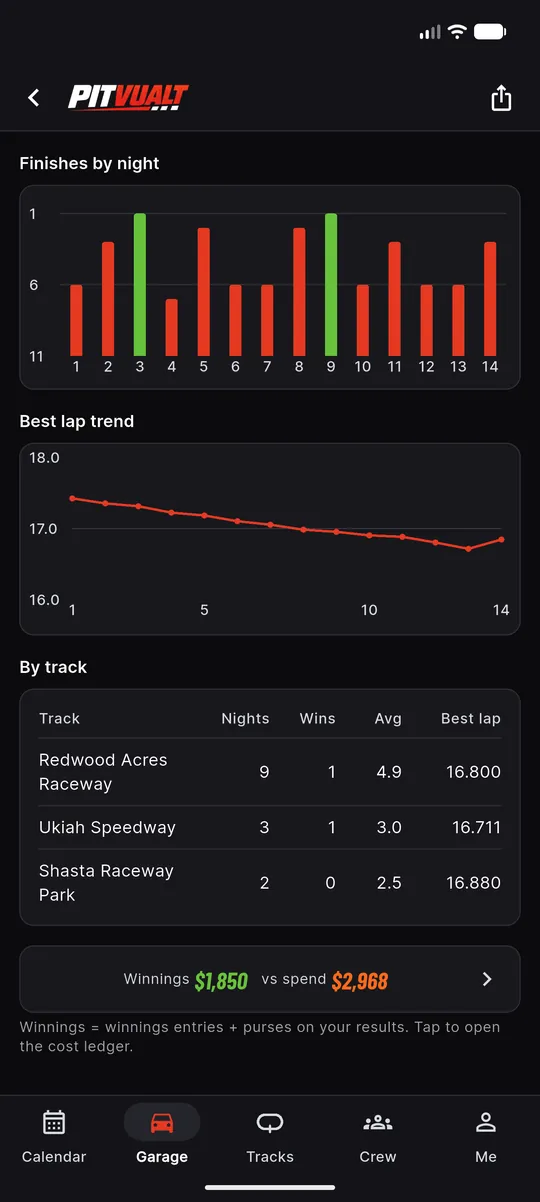
By-track results
Nights, wins, average finish and best lap at every track, and winnings against spend.
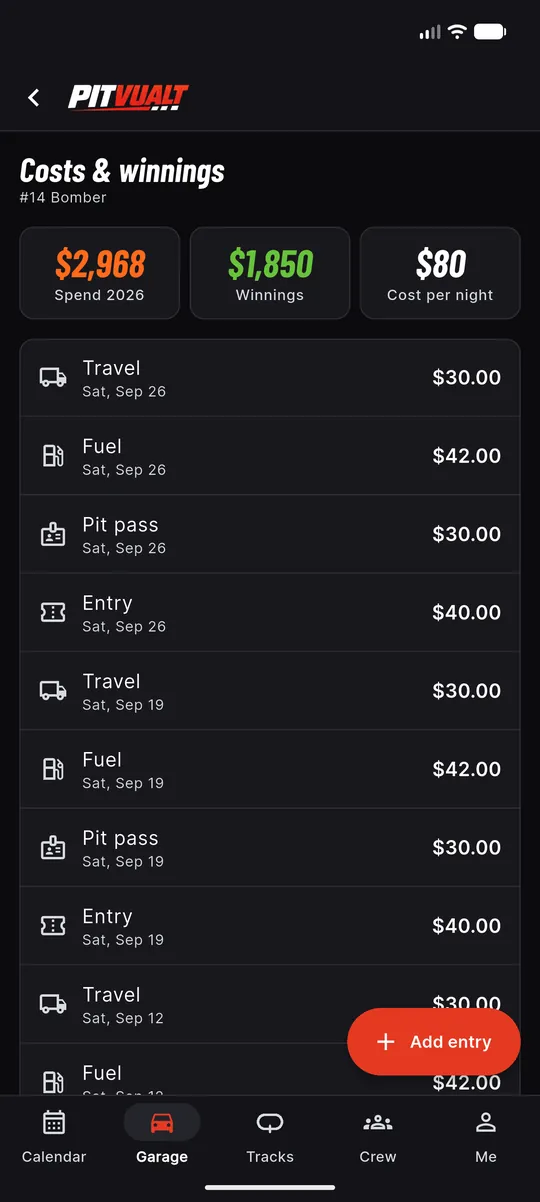
Cost ledger
Entry, fuel, pit pass and travel for every night. Spend, winnings and cost per night, or profit per night.
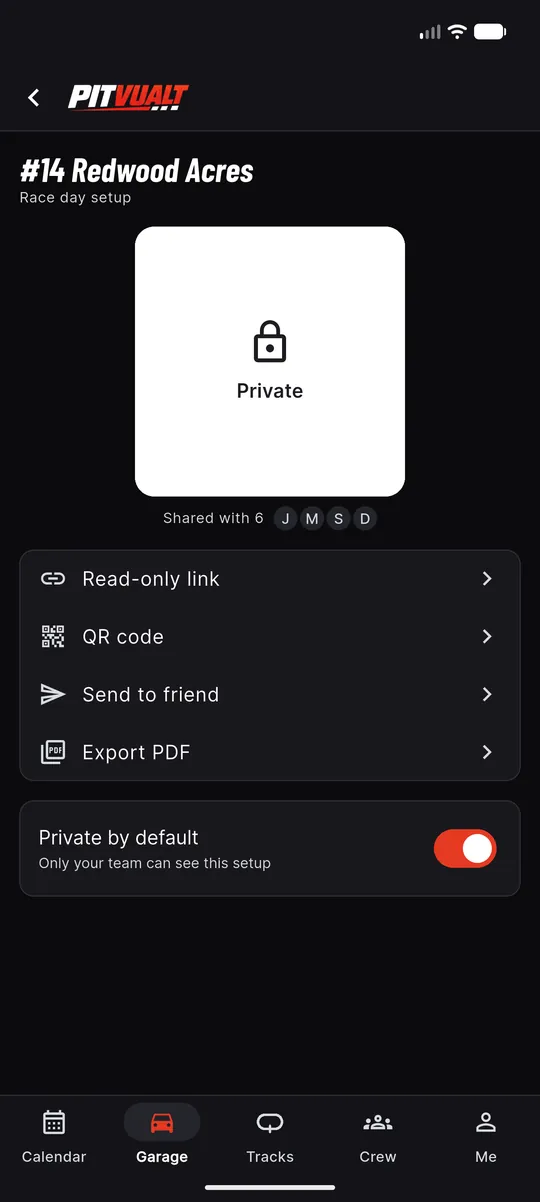
Share a setup
Private by default. Read-only link, QR code, send to a friend or PDF when you choose.
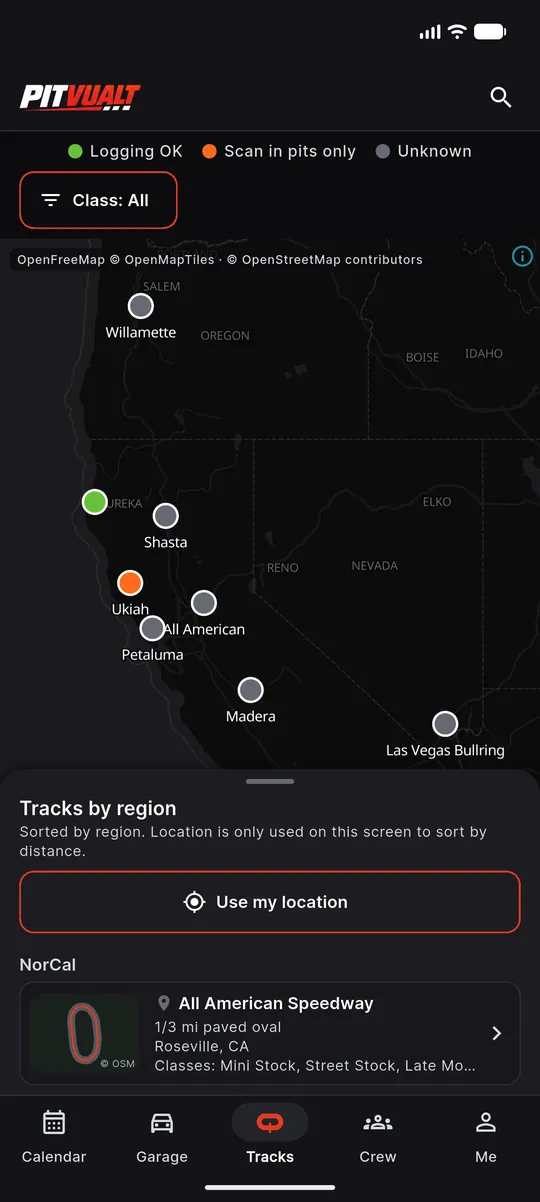
Track map
Every track on one map, with the device rule shown on each pin.
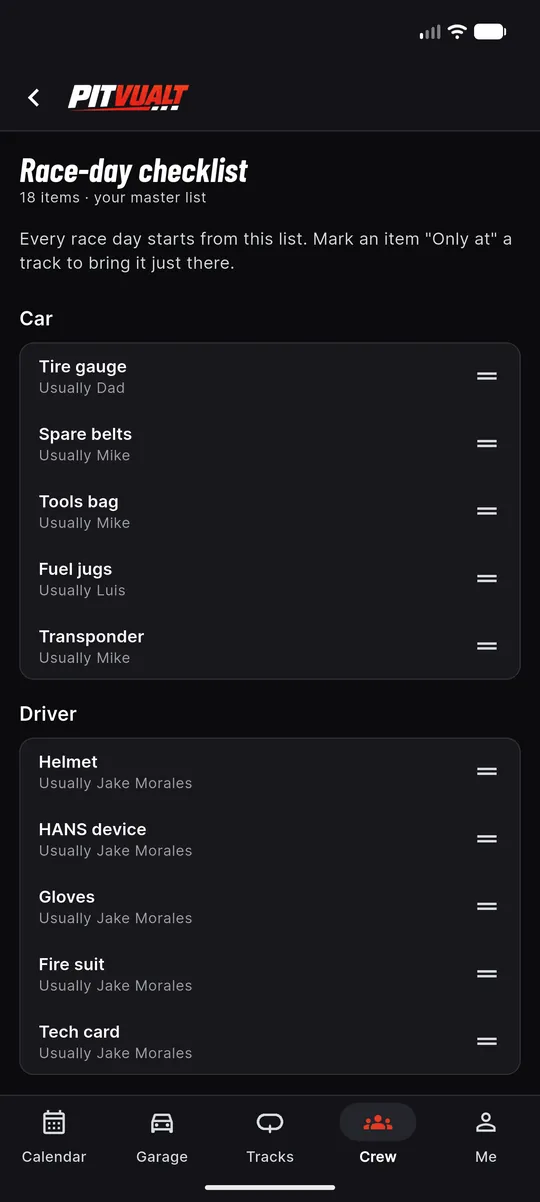
Checklist master list
The list every race day starts from, with who usually brings each item.
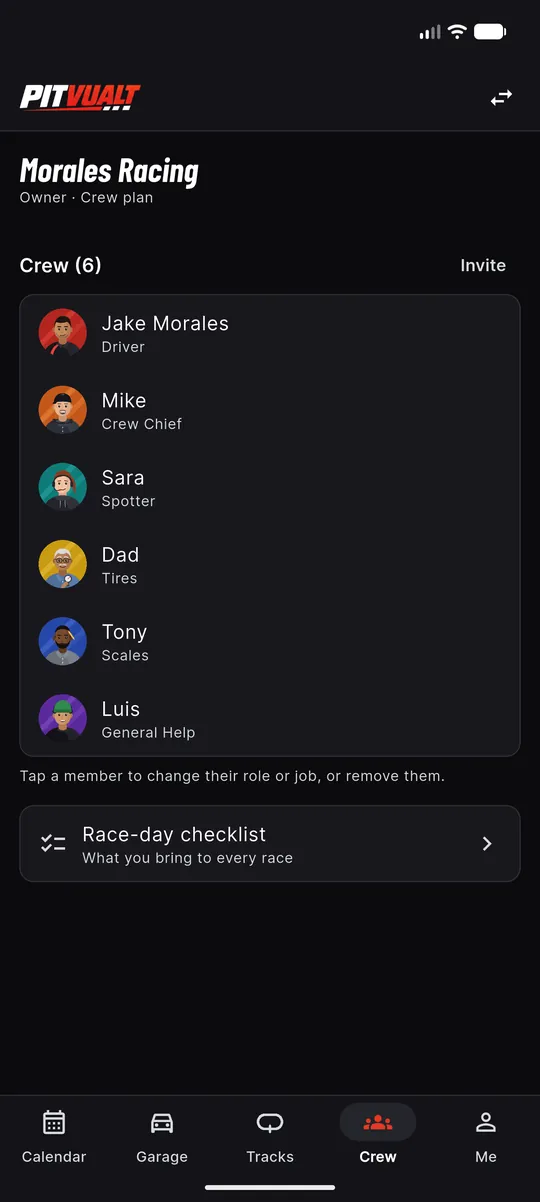
Crew roles
Driver, crew chief, spotter, tires, scales and general help, all in one list.
App screens are captures of the demo build with fictional sample data; the shipping app may look slightly different.
Your setup book belongs in your pocket.
Start free with one car. Your data stays yours.